SEJR POS · Reports and accounts
Month-end for your accountant
Here you learn how to gather the month's figures for your bookkeeper or accountant.
Watch how it is done48 sec.
You download a sales report and all of the month's Z reports.
Step by step
Tick a step when it is done
Button names are written as they appear on a till set to Danish. The brackets give the name on a till set to English, the first time a button is mentioned. Change the till's language
- Tap Admin at the top right of the till.
- Enter your 4-digit admin PIN.
- Choose Salgsrapporter (Sales reports) in the menu on the left.
- Choose the first and the last day of the month.
- Tap Hent rapport (Load report).
- Tap Download PDF and Eksporter salg (CSV) (Export sales (CSV)).
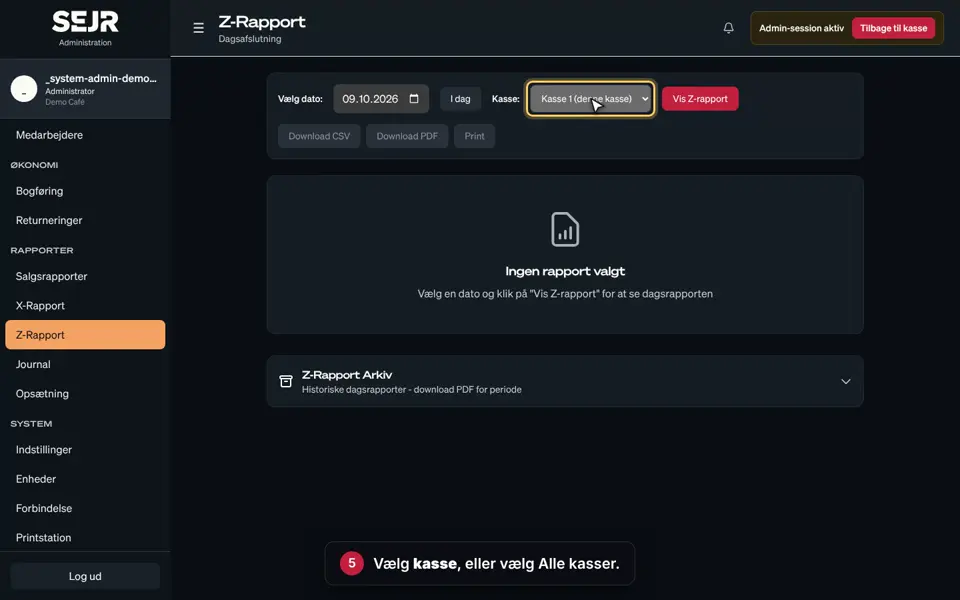
- Choose Z-Rapport (Z-Report) in the menu on the left.
- Open Z-Rapport Arkiv (Z-Report archive), and choose 1 måned (1 month).
- Tap Download Periode PDF (Download period PDF). You then get all the Z reports in one file.
- Choose Bogføring (Accounting) in the menu on the left.
- If you use bookkeeping, check that all the Z reports are marked Bogført (Booked).
Good to know
- Every day you are open must have a Z report. If a day is missing, contact SEJR Support.
- CSV: Can be opened in e.g. Excel.
- Storage: The Z reports must be kept for at least 5 years. SejrPos keeps them for you.
- SAF-T: If the Danish Tax Agency (Skattestyrelsen) needs a SAF-T file, see the guide Request SAF-T.
Finishing up
The month's figures are now gathered and ready for your bookkeeper or accountant.
Still not working? Contact SEJR Support. We are happy to help.
Did the guide help you?